AI in practice · Handy Homes

My AI Engineering.

At Handy Homes I built and led a four-engineer team, learned AI-assisted development alongside them, and ended up writing most of the code for our customer and technician apps myself.

When I started the company, AI could not do the coding we needed, so we paid a Salesforce partner about $70,000 to build the customer app. The result was not good. Once the tools could carry more of the development, we wrote our own native iOS and Android apps, which we could not have afforded at the start.

The products

Two applications, two audiences.

The customer needs to understand their plan and their next visit. The technician needs the right information and a clear record of the work. Choose a screen under each phone, and select the phone to enlarge it.

Handy Homes app icon

Customer mobile app

Handy Homes

Learning what Home Care is, choosing a plan, booking a visit, and setting up an account.

Choose a Handy Homes screen

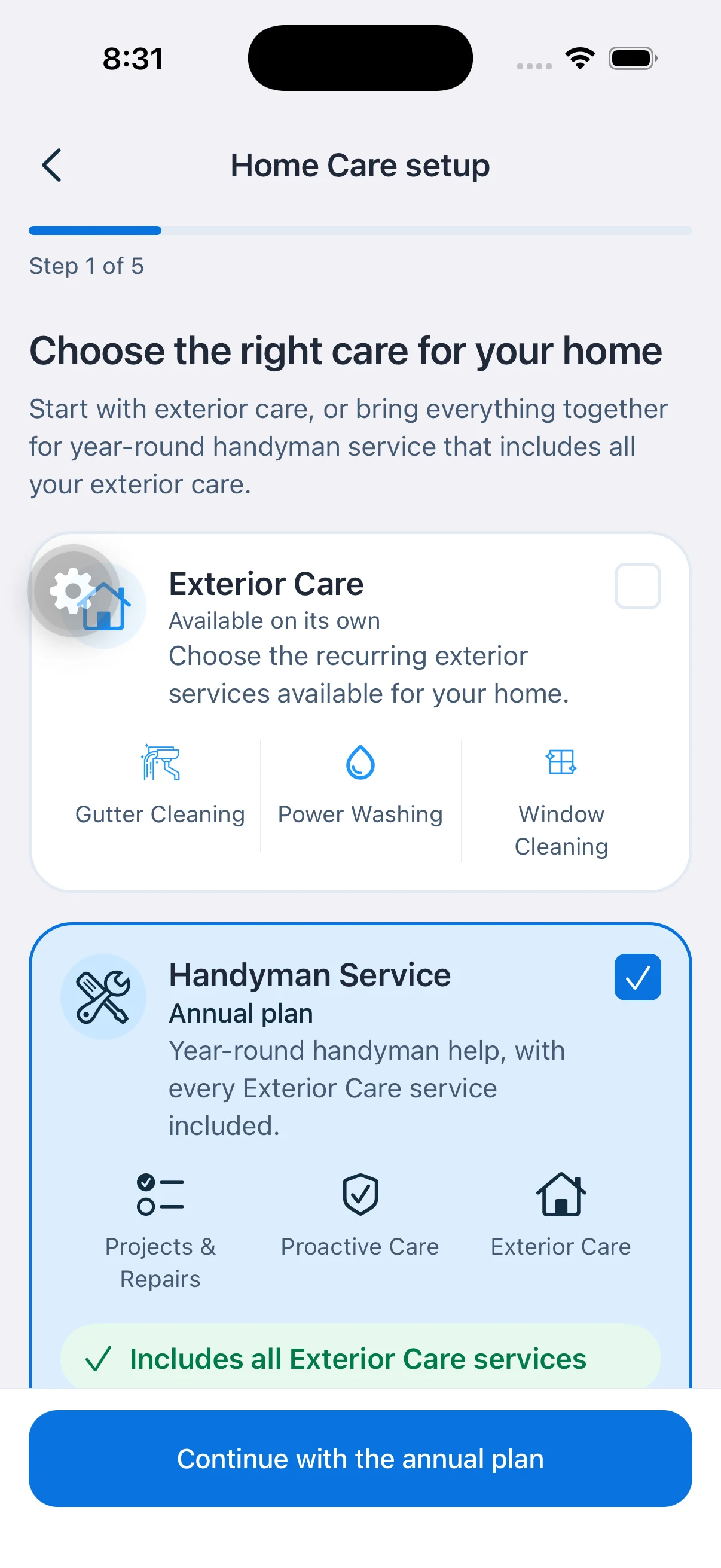
Home Care plan selection: exterior care alone, or the annual handyman plan. iOS simulator capture, August 2026. The round gear button is a developer menu.

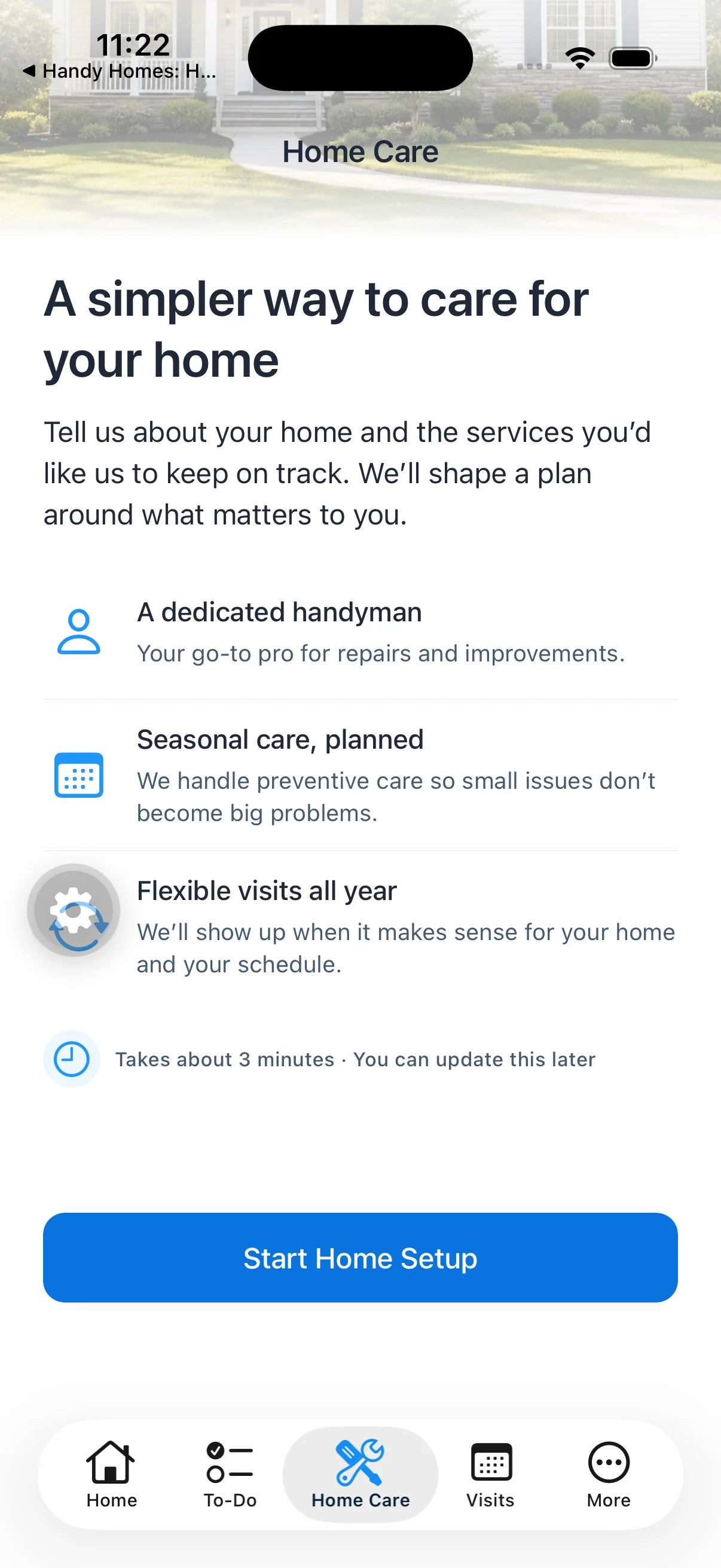
Home Care introduction: what the service is, before any setup. iOS simulator capture, August 2026. The round gear button is a developer menu.

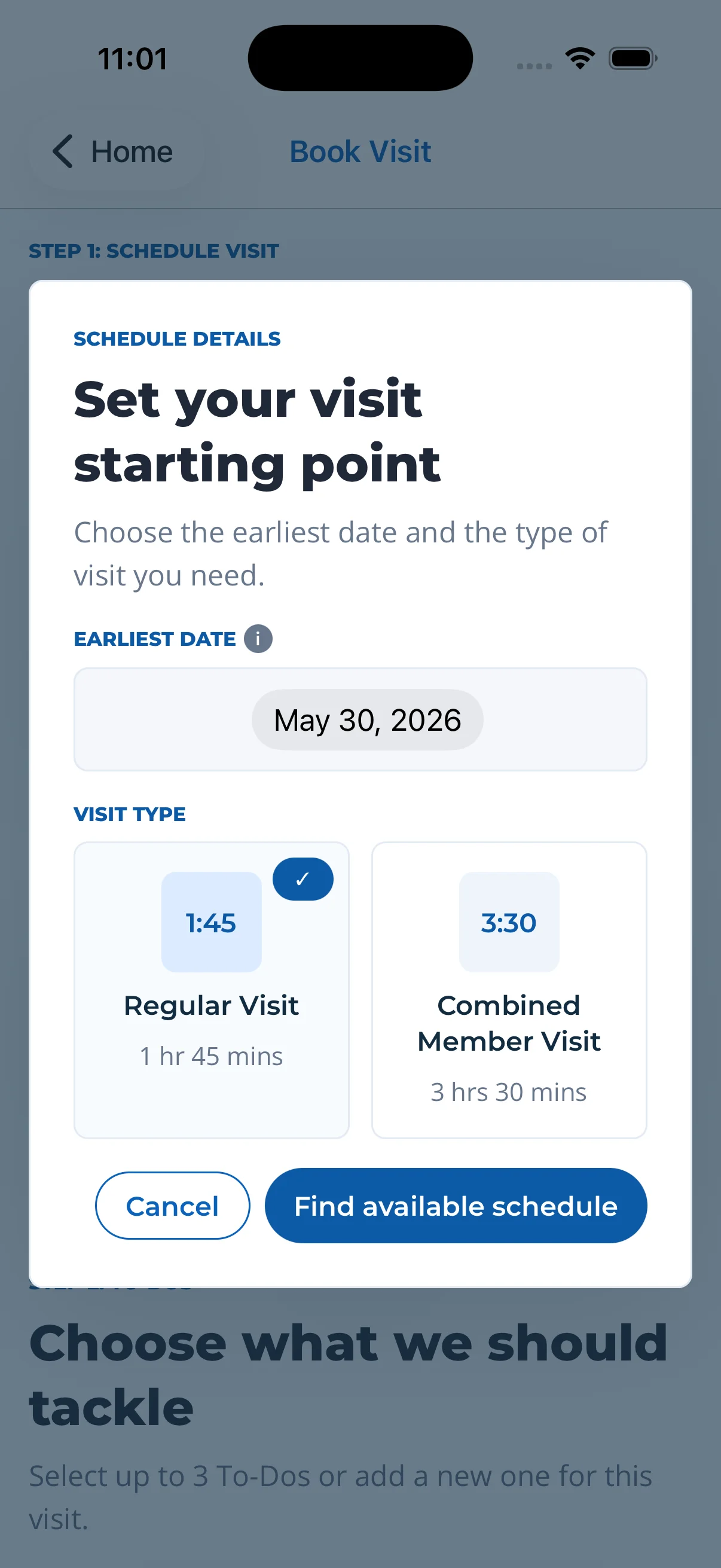
Booking a visit: the customer picks an earliest date and a visit length. Simulator capture from a design check.

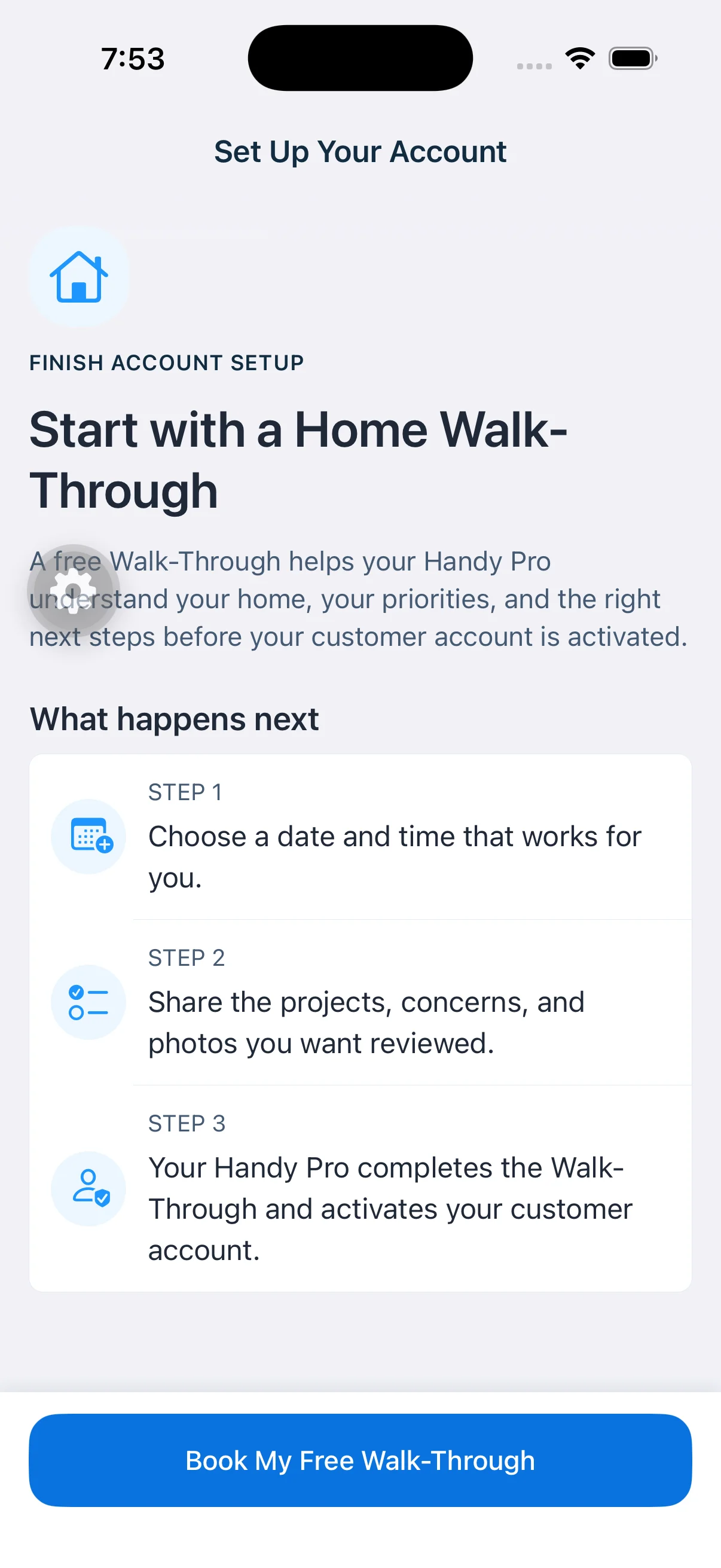
Account setup: why the first step is a walk-through, and what happens next. iOS simulator capture, August 2026. The round gear button is a developer menu.

HandyPro app icon

Field technician mobile app

HandyPro

Appointments, job details, quotes written on site, and service notes with AI help.

Choose a HandyPro screen

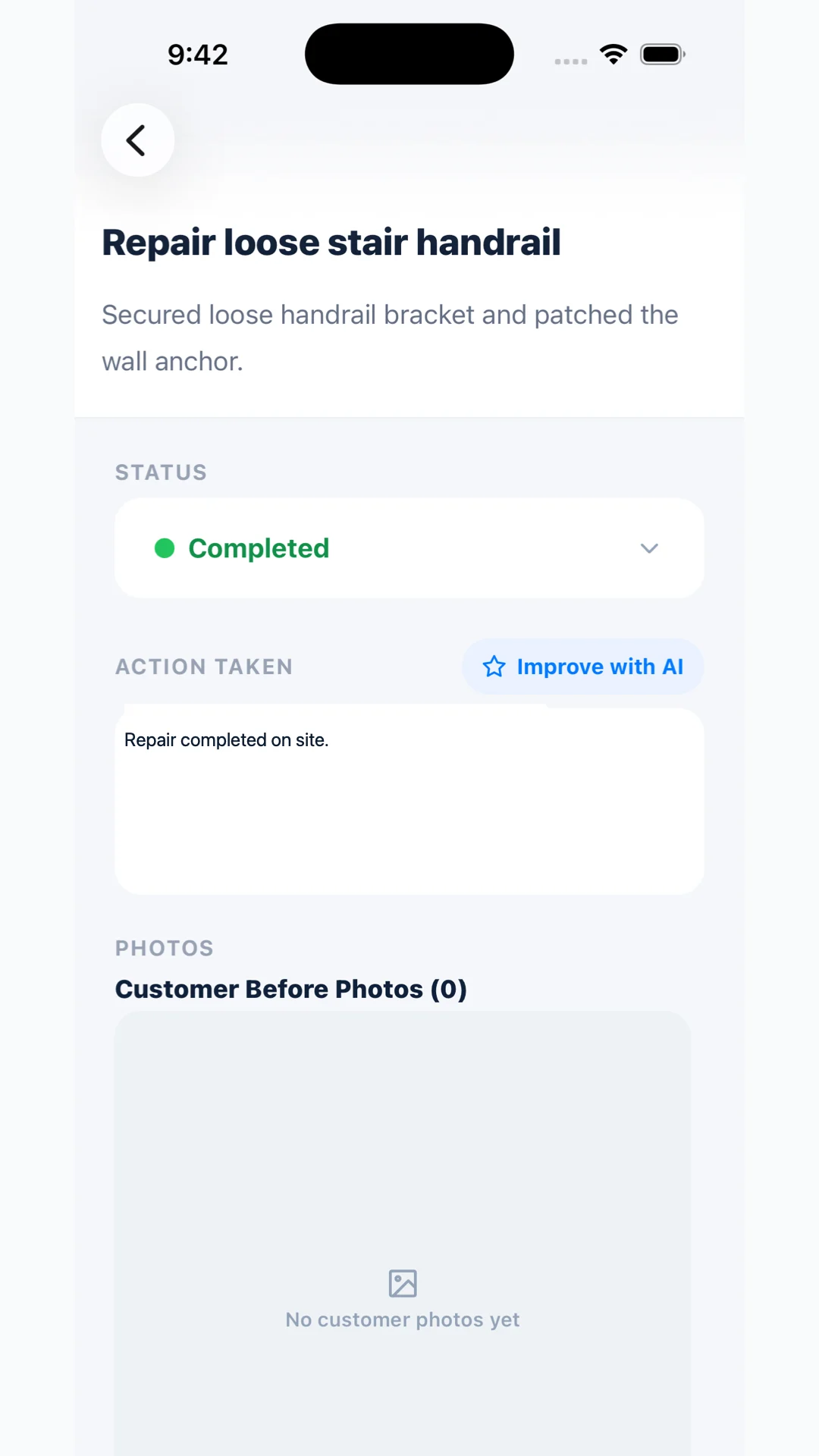
Task notes with Improve with AI: a technician’s note, with the option to have it rewritten for the customer. Store-preparation image from an iOS simulator capture, July 2026. Generic content.

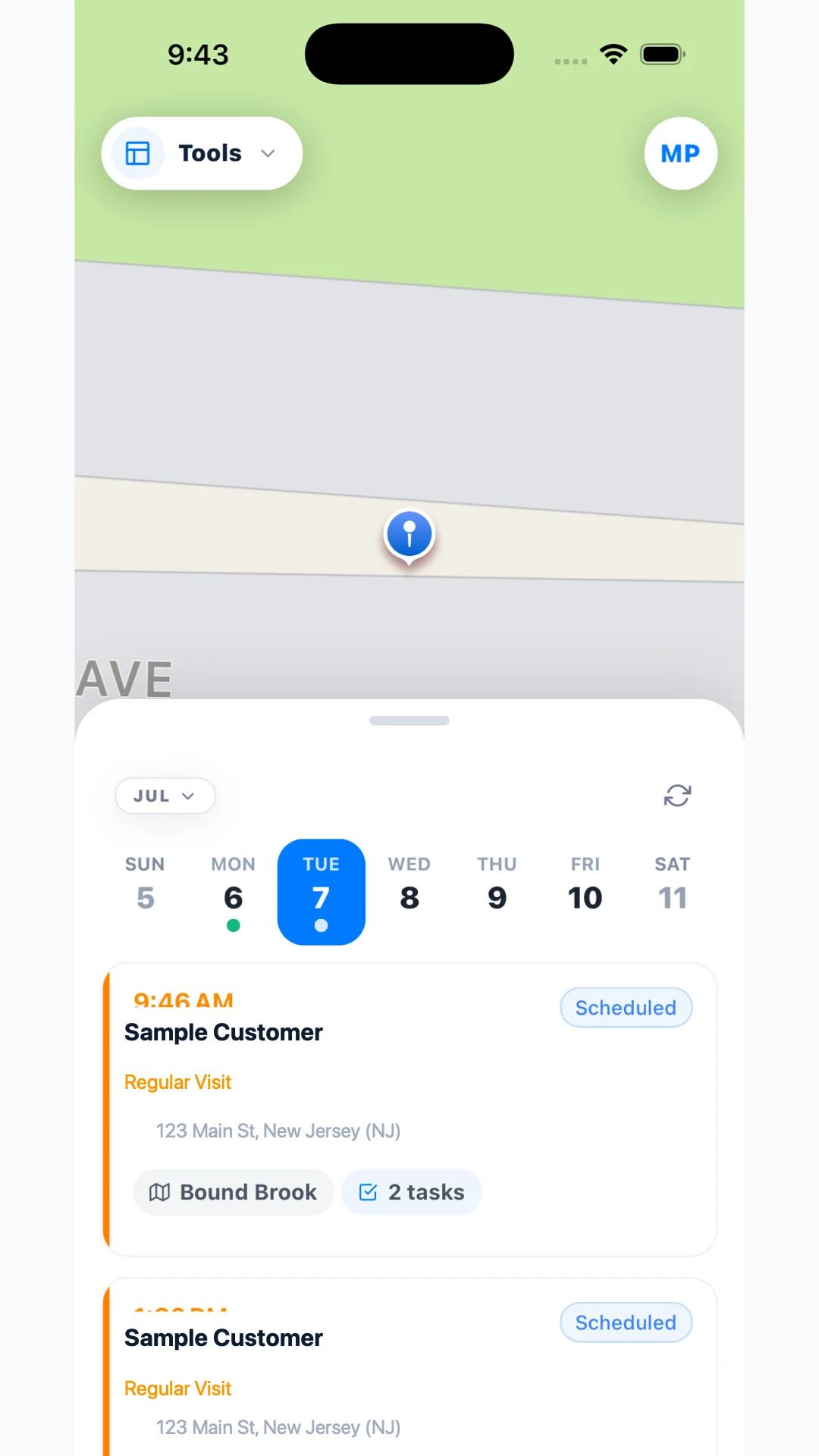
Appointment schedule: the day’s visits under a map. Store-preparation image from an iOS simulator capture, July 2026. Sample customer and address.

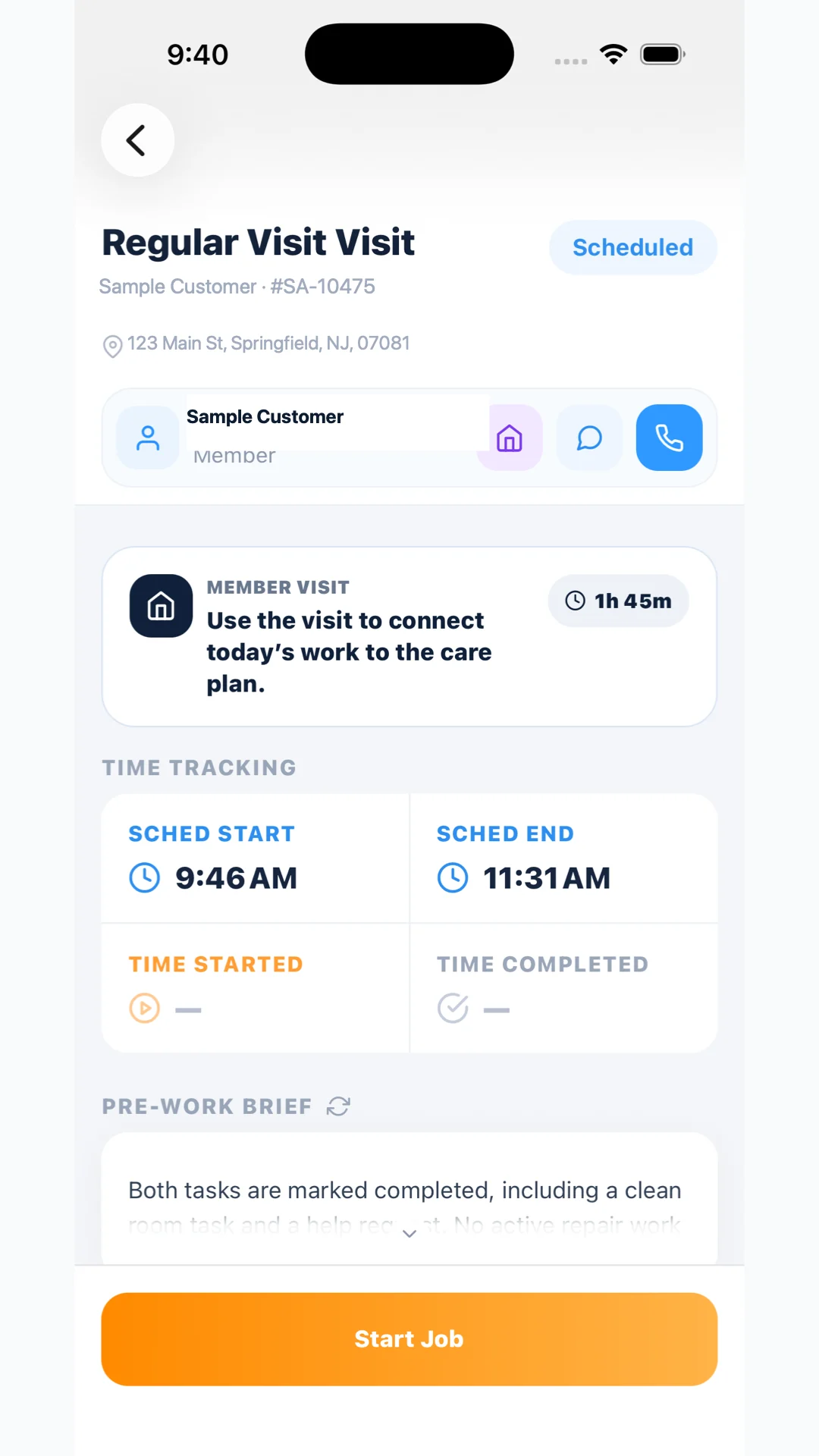
Job details: scheduled times, the pre-work brief, and Start Job. Store-preparation image from an iOS simulator capture, July 2026. Sample customer and address.

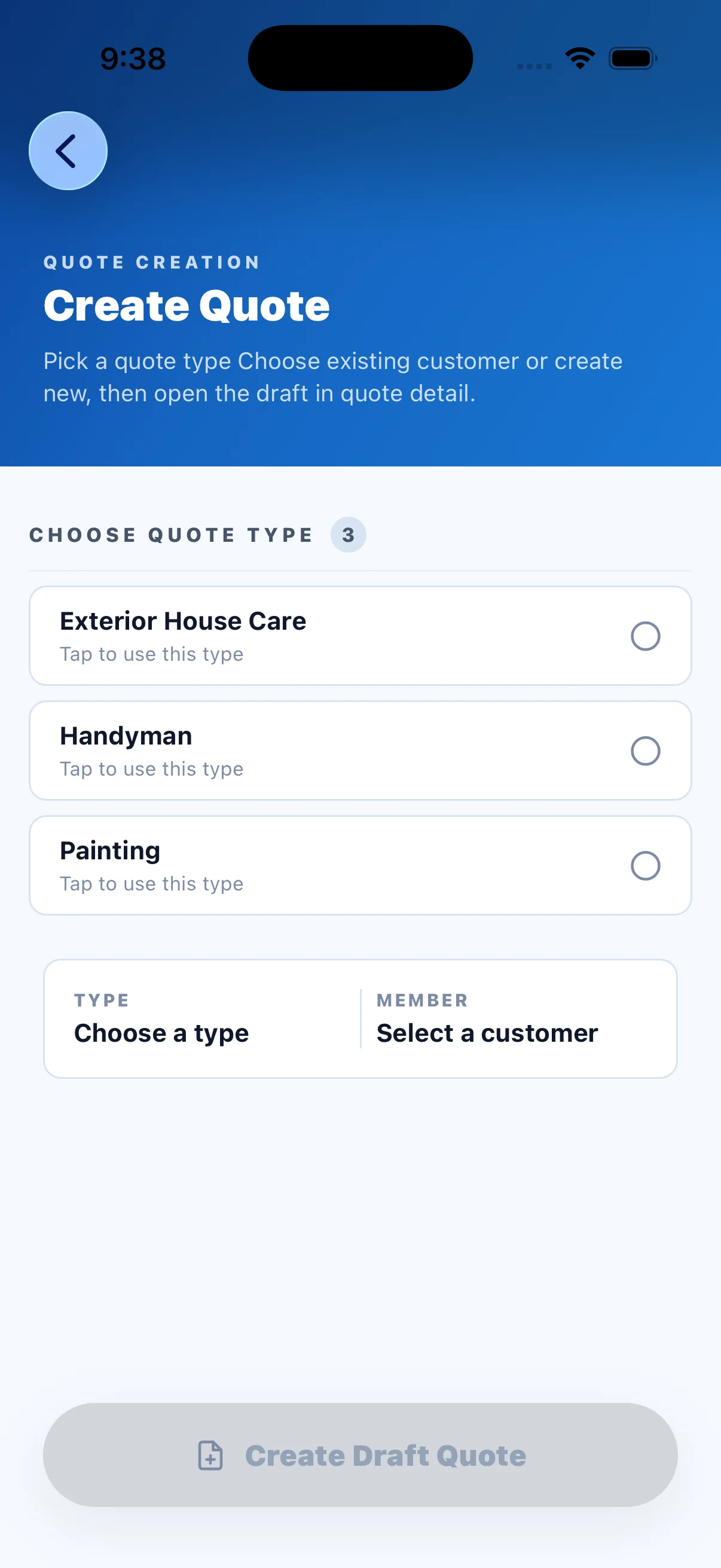
Creating a quote: quote type first, then the customer. Raw iOS simulator capture, July 2026. No customer selected.

Three short case studies

What I worked on, and how far it got.

Each one separates my contribution from the team’s, and ends with the stage that was actually verified. Where something reached a test environment and no further, I say so.

01

Product judgment and customer workflows

Most of what I brought was knowing the operation firsthand. That let me tell when a screen was technically correct and still wrong for the person using it.

The problem
New customers were landing on a status dashboard before their Home Care plan had left draft. Booking defaulted to a first-available slot, which confused people who wanted to choose a day. And the technician’s home screen opened on a map when the technician wanted the next job.
What I did
I traced the onboarding problem to the conditions the app used to decide a customer was active, wrote up the specific criteria, and sent front-end changes as pull requests that I tested in our test environment. I set the priorities that followed: show plan progress correctly, save tasks and photos reliably, and let customers pick a day and time for the walk-through. For technicians, I drafted a redesigned home screen built around full-screen appointment cards that separate fixed-price work from membership visits.
What the team did
One engineer took the state fix between the app and the backend, and reviewed and merged my pull requests. Our backend lead handled the scheduling and data issues and deployed the paired backend change to the test environment.
The artifact
Front-end pull requests for the customer app, a written set of state criteria, and a draft home-screen redesign for HandyPro.
Stage verified
Customer app changes were reviewed, merged, and tested in the test environment with the paired backend change. The home-screen redesign was a draft that I asked the team to hold before merging. The HandyPro schedule screen above shows the earlier map layout, not the redesign.

02

Hands-on AI implementation

There are two different things here, and I try to keep them apart. One is using AI to build software. The other is putting an AI feature inside the product.

The problem
Technicians typed appliance and generator model and serial numbers by hand from the identification plate. They finished the day with no view of tomorrow. And notes written quickly on a job site did not always read clearly to the customer.
What I did
I used OpenAI’s Codex to work in both codebases, the mobile apps and the Salesforce backend. With it I built a flow where the technician photographs the identification plate and OpenAI image analysis extracts the model and serial numbers, including the upload trigger and a retry path. I built a next-day preparation brief that is generated after the technician’s last appointment, with standard preparation points shown if the AI call fails. And I worked on Improve with AI, which proposes a clearer customer-facing version of a technician’s note. The technician accepts or reverts it, and the instructions to the model prohibit adding details the technician did not write.
What the team did
An engineer worked through how the image-analysis credential should be configured. Engineers reviewed the pull requests, and our backend lead kept responsibility for production deployments.
The artifact
Paired mobile and backend pull requests for each feature, with tests. The Improve with AI control is visible on the HandyPro phone above.
Stage verified
Photo extraction: validated in the test environment on a test generator record. Next-day brief: backend deployed to the test environment, with the mobile changes pushed separately for review. Improve with AI: implemented in the app and backend source. I am not claiming accuracy rates or production availability for any of the three.

03

Testing, collaboration, and release discipline

AI made it easy to produce changes. It did not make them correct, and it did not make them shipped. Most of what I learned was about the distance between those three.

The problem
A quoting improvement was merged and its backend deployed, and the screen I expected was still missing from the app. Separately, one long AI-assisted session drifted well past its original scope and left a pile of overlapping draft pull requests.
What I did
I submitted my work as draft pull requests, recorded what I had tested locally, and kept “open”, “merged” and “deployed” as separate words. When the quote screen was missing, I reported what I saw on the device and we traced it to a further change that was still needed. After the drift, I audited the superseded drafts to pull out anything worth keeping, then went back to narrower tasks and to reading generated changes before sending them on.
What the team did
Engineers reviewed and merged, grouped changes into release pull requests, ran the over-the-air and store updates, and found problems the simulator had hidden, such as a keyboard layout issue that only appeared on real devices.
The artifact
A working practice: draft pull request, engineer review, test environment, then a check of the actual screen on a device before anyone calls it done.
Stage verified
These are lessons about process. The record shows the problems being caught and the practice changing. I did not measure reliability before and after, so I am not claiming a number for it.

A successful backend deployment did not mean the mobile screen had shipped. I stopped accepting a deployment message as proof and started looking at the screen.

Who did what

My contribution, and the engineering partnership.

I did not build these applications alone, and I did not create every screen pictured on this page. Four engineers built the first app, and I learned alongside them. I then spent a couple of months learning interface design. During 2026 I saw that I was writing the instructions and the engineers were handing them to AI, so I began doing that work directly. By the end there was one full-time contractor, who integrated and released my code, and I was doing about 80% of the development across both apps.

What I did

  • Defined requirements from the operation: what customers and technicians needed a screen to do, and in what order.
  • Used Codex to make changes in the mobile apps and the Salesforce backend, and kept its working instructions up to date.
  • Contributed changes as pull requests, and debugged them when they did not behave.
  • Tested workflows in the simulator and the test environment, and reported what I saw on the screen.
  • Decided what mattered most and what could wait.

What the engineers did

  • Designed and built the first applications, the backend, and the interfaces between them.
  • Reviewed my pull requests, corrected them, and merged the ones that held up.
  • Ran the infrastructure, test environments, credentials, and build configuration.
  • Integrated and released the code, including production deployments.
  • Caught the problems I could not see, and explained why they happened.

The other half

AI in the running of the business.

Finance, marketing, estimating and support, what did not work, and what I would do with it in a revenue organization.

AI in the business

Contact

Happy to walk through any of it.

If this is relevant to a role you are hiring for, I would be glad to talk through the work in more detail.